



Microsoft Outlook is used by most businesses on the planet, however Outlook search is a well-known issue for most Windows search users. Lookeen can be integrated as an Outlook add-on and supports Exchange Servers, making it the best full-text search solution on the market – more than 30,000 companies worldwide trust Lookeen to find their emails and data.
The Ultimate Desktop Search.
Find everything you need, when you need it.
Download - Free 14-day trialCUSTOMERS IN OVER 100 COUNTRIES TRUST IN LOOKEEN

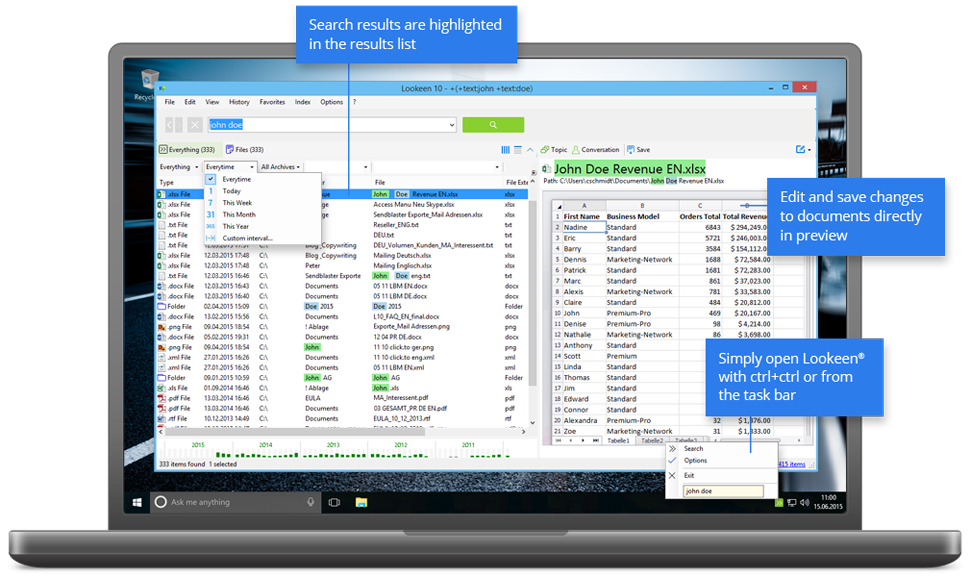
Benefits of Lookeen Search Software
- Overcome information overload: Lookeen indexes and searches an unlimited number of files in all popular formats and can reliably find information as soon as you need it.
- Work faster in Outlook: Directly incorporated into Outlook as a search plugin, with Lookeen you no longer need to open multiple programs. Search all of your emails, attachments, appointments, tasks, notes, contacts or calendar entries. The Outlook add-on integrates seamlessly with Outlook 2021, Outlook 2019, Outlook 2016, Outlook 2013, Outlook 2010, Outlook 2007, Outlook 2003, and Office 365.
- Improve desktop search: A step above Windows search, Lookeen can be accessed from the Windows taskbar, or by double tapping the CTRL key, no matter which program you’re working in. Creating folders and organizing files will be a thing of the past, simply access everything from the Lookeen search application. Lookeen is compatible with Windows 11, Windows 10, Windows 8, Windows 7 and Windows Vista.
- Massively increase PC search speed: With the help of automatic real-time indexing, Lookeen gives you the freshest search results in a matter of seconds.
- Become a search expert: Advanced search queries and filter functions make it easy to further refine your search results. Learn more about the features of our Windows and Outlook Search alternative here.
- Gain an overview: Thanks to the colored highlighting of the search words, you can see which results are relevant at a glance. This is what Lookeen looks like at work.
- Privacy guarantee: The entire index and all of your data are saved locally on your own server.
- Conserve system resources: Lookeen is designed so that the load on your computer, network and Exchange Servers remains as low as possible. Thanks to various settings in the search tool, Lookeen indexing is fast and reliable on older Windows® systems too.
- Easy to install: Lookeen runs on all Windows operating systems and can be installed within a few minutes – just download and follow the instructions in the installation wizard. It is also compatible with Terminal Servers and virtual desktops (VDI) such as Citrix®, VMware® or MS Remote Desktop. Installation and enterprise-wide rollout are also simple, thanks to our extensive group policy.
- Easy to use: The intuitive user interface makes using Lookeen child’s play. Easily view your data in the search results list, the advanced filters and highlighting system means that your emails, documents and folders are one click away.
- Simple to maintain: Each single-user license is valid for a lifetime. You can easily download free updates so you always have the best search software Lookeen has to offer. Run into problems? We offer free support for every user.
Our whole company benefits from amazing Outlook searches since we found Lookeen.
Eli Snir, Avnet, Israel
Lookeen for your Business
When looking for a professional desktop search tool, you should be able search for files and your inbox data at the same time. The Lookeen search solution uses a purpose-built indexer to catalogue all of your data. The index enables simultaneous desktop search and Outlook search from the system tray plugin or from the program itself, making Lookeen the perfect alternative to Google Desktop Search.
Companies can lose thousands of dollars a year through inefficient and ineffective search practices. The Lookeen Enterprise Search solution saves your company money by giving each employee access to a shared index, which saves time, duplicate effort and opportunity costs associated with bad data search. Easily find data on the network, in shared folders, and Public folders, as well as your inbox and across Exchange Servers.
 Adoption of virtual desktops is becoming increasingly common in companies across many industries. Email and file search in virtual desktop environments is, however, notoriously difficult and ineffective. Using Citrix or VMware in your enterprise? Lookeen’s search engine and index fully support Windows desktops shared through Citrix, VMware, Terminal Servers and MS Remote Desktop.
Download your free trial now!
Try the full version of Lookeen for 14 days for free and with no obligation to buy.
IN THE PRESS
